


The Sims 3 70's, 80's and 90's PC & Mac EA App Key
The Sims 3 70's, 80's and 90's PC & Mac EA App Key
In stock
Couldn't load pickup availability
This product can be activated in the following countries:
DM, DO, SV, GL, GD, GP, GT, HT, HN, JM, MQ, MS, UM, NI, PA, PR, BQ, BL, KN, LC, MF, PM, VC, BQ, SX, CW, CU, CR, CP, KY, VG, BQ, BM, BB, BS, AW, AI, AG, BZ, MX, US, CA, VA, SJ, JE, IM, GI, GG, GB, UA, TF, AQ, NF, WF, TK, PN, PF, NU, NC, MP, HM, GU, CX, CK, AS, VU, TV, TO, SB, WS, PG, PW, NR, MH, KI, FO, NZ, FJ, AU, AN, UM, BV, VE, UY, SR, GS, PE, PY, GY, GF, FK, EC, CO, CL, BO, AR, BR, VI, TC, TT, KZ, JO, JP, IL, IQ, IR, ID, IN, TL, CN, KH, BN, BT, BD, BH, AZ, AM, AF, YT, SH, ZW, SD, ZM, EH, UG, TN, TG, TZ, SZ, SS, ZA, SO, SL, SC, SN, ST, RW, NG, NE, NA, MZ, MA, MU, MR, ML, MW, MG, LY, LR, LS, KE, GW, GN, GH, GM, GA, ET, ER, GQ, DJ, CI, CD, CG, KM, TD, CF, CV, CM, BI, BF, BW, BJ, AO, DZ, EG, CH, SE, ES, FR, SI, SK, RS, SM, RU, RO, PT, PL, NO, NL, ME, MC, MD, MT, MK, LU, LT, LI, LV, XK, IT, IE, IS, HU, GR, DE, GE, FI, EE, DK, CZ, CY, HR, BG, KW, KG, LA, LB, MY, MV, MN, MM, NP, KP, OM, PK, PH, QA, SA, SG, KR, LK, SY, TJ, TH, TR, TM, TW, AE, UZ, VN, YE, CC, HK, MO, PS, AL, AD, AT, BY, BE, BA
Product details
DESCRIPTION
Step Back in Time with The Sims 3: 70s, 80s, & 90s Stuff
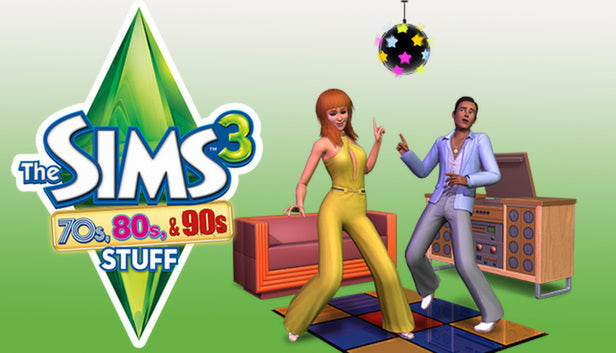
Warp your Sims back to the most iconic decades of the 20th century with The Sims 3 70s, 80s, & 90s Stuff. This essential expansion pack for PC and Mac brings a treasure trove of retro fashion, hairstyles, and vintage decor to your game. Whether you want to boogie in the disco era, embrace the neon glam of the 80s, or go full grunge in the 90s, this collection allows you to recreate the unique vibes of yesteryear with stunning detail.
Iconic Retro Fashion and Hairstyles
Give your Sims a total makeover with era-specific clothing. Dress your Sims in wide-collared suits and bell-bottoms for the 70s, layer up with legwarmers and shoulder pads for the 80s, or opt for the tattered flannel and asymmetrical skirts of the 90s. Complete the transformation with classic hairstyles, from feathered layers and big teases to the iconic lank grunge look. Your Sims will be the talk of the town in these timeless styles.
Vintage Decor and Retro Furnishings
Revamp your Sim's home with authentic furniture and entertainment items. Add a minimalist touch or a shimmering disco ball for a 70s flair, bring in arcade games and pinup pop art for an 80s bedroom, or choose distressed industrial furniture for a moody 90s vibe. From the neon Foosball Table to high-tech (for the time) stereo systems, every item is designed to immerse you in a blast from the past.
Key Features:
- Decade-Specific Styles: Authentic clothing and hair representing the best of the 70s, 80s, and 90s.
- Retro Home Objects: Wide variety of furniture and decor items to theme any room.
- Seamless Integration: Fully compatible with The Sims 3 base game on PC and Mac via the EA App.
- Immersive Gameplay: New stereo music and objects that capture the spirit of each era.
- Creative Expression: Infinite possibilities to mix and match styles across three legendary decades.
Don't just play with life—play with history! Grab The Sims 3 70s, 80s, & 90s Stuff EA App Key today and let your Sims revel in the groovy, radical, and gnarly styles of the past.
© 2013 Electronic Arts
SUMMARY
- Release date:
- Publisher:
Electronic Arts
- Developer:
Maxis, The Sims Studio
- Genres:
Simulation
- PEGI rating:
12
- Activation platform:
EA App
- Native systems:
PC & Mac
- Playable on:
Microsoft Windows, Apple Mac
- Supported languages:
PT, RU, IT, FR, DE, ES, EN, KO, FI, NO, DA, ZH, PL, SV, CS, HU, NL
- Activation region:
Worldwide
- Region exceptions:
No exceptions apply
LEGAL DISCLAIMER
This EA App key is a genuine, brand-new retail license sourced via reliable B2B distribution channels and delivered electronically via email. Due to the nature of digital goods, the standard 14-day cancellation right is waived once the key has been delivered, unless proven defective. Activation constitutes legal acceptance of the publisher's underlying end-user license agreement (EULA) and third-party terms of service.
ACTIVATION INSTRUCTIONS
- Download and install the EA App*
- Open the EA App
- Sign into your EA account
- Navigate to “My library”
- Select “Redeem Code”
- Enter your product key
- Follow the prompts to complete activation